How to send voice messages, photos, documents and more
In short
Everything is sent from the bar at the bottom of a chat.
Text: type and tap the send arrow.
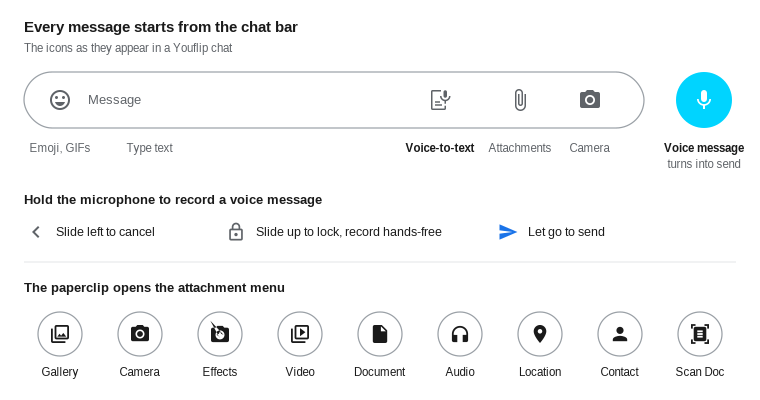
Voice message: tap the microphone to record, then send. Or hold the microphone and let go to send; slide left to cancel, or slide up to lock and record hands-free.
Your phone is the main home of your chats. Messages, photos, videos and voice notes are kept on your phone. Our servers only pass them on and hold them for a limited time, as shown below.
Types of messages and how to send them
All message types are sent from the bar at the bottom of a chat. The paperclip opens the attachment menu.
| Message | How you send it | How it is kept private |
|---|---|---|
| Text | Type in the message box and tap the send arrow. | Encrypted while it travels; only the people in the chat can read it. |
| Voice message | Tap the microphone to record, then send. Or hold the microphone to record and let go to send; slide left to cancel, slide up to lock and record hands-free. | Kept on the phones in the chat; deleted from our servers after delivery. |
| Voice-to-text | Tap the voice-to-text button in the message box and speak; your words are typed for you to check before sending (How to change the app language). | The recording is not kept. |
| Photos | Paperclip, then Gallery or Camera; Effects adds filters and effects. | Kept on the phones; deleted from our servers after delivery. |
| Videos and video notes | Paperclip, then Video; or record a short video note in the chat. | Kept on the phones; deleted from our servers after delivery. |
| Documents | Paperclip, then Document, or Scan Doc to scan paper with your camera. | Kept on the phones; deleted from our servers after delivery. |
| Audio files | Paperclip, then Audio. | Kept on the phones; deleted from our servers after delivery. |
| Location | Paperclip, then Location. | Shared only when you choose to send it (Choose who sees your last seen, photo and status). |
| Contact | Paperclip, then Contact. | Shares only the contact you pick. Only share someone's details with their permission. |
| Emoji, GIFs and stickers | Tap the smiley in the message box. | Like text. |
| Listings and links | Share a Marketplace listing or paste a link. | Like text. |
How long media stays on our servers
Once media is deleted from our servers, it can only be found on the phones that received it. If you lose your phone without a backup, we cannot recover your chats.
Still need help? In the Youflip app, go to Settings → Help → Contact Customer Care to chat with the official Youflip Support account.